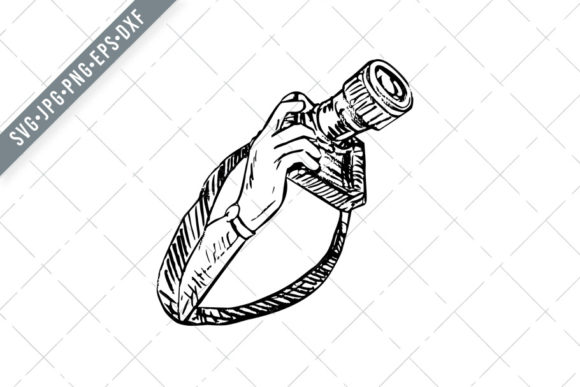
Hand Holding Up a DSLR Camera Illustration for Design Projects
When a design calls for an image that says “photography,” “creativity,” or “capture,” the right visual can make the difference between a generic layout and a memorable one. Hand Holding Up a DSLR Camera is a scratchboard-style illustration that delivers exactly that kind of impact. Rendered in black and white on an isolated background, this asset offers a clean, high-contrast depiction of a hand raising a DSLR camera complete with strap. It isn’t a photograph, but a stylized illustration with deliberate linework, texture, and shading that feels both handcrafted and precise. For anyone building banners, cards, patterns, scrapbooking layouts, party invitations, covers, accessories, or birthday materials, this file set provides a versatile foundation.
What Makes the Scratchboard Style Distinctive
Scratchboard illustration mimics the technique of scratching through a dark ink layer to reveal a white or light surface beneath. The result is a high-contrast image with fine lines, crosshatching, and a sense of motion or energy that flat vector art sometimes lacks. In Hand Holding Up a DSLR Camera, the hand and camera are built from crisp, deliberate strokes that give the subject texture and depth. The black background makes the white lines pop, which is ideal for projects where you want the silhouette or outline to stand out without competing with other elements.
This is not a simple cutout or a generic clip-art outline. The scratchboard approach adds a level of detail that suggests the shape of the camera body, the lens, the strap, and the fingers around the grip. The camera is held in a natural, upward position, which implies readiness, action, or a moment of capture. That sense of purpose makes the illustration more than a decorative icon—it becomes a symbol of the act of photography itself.
File Types and Practical Usability
The zip download includes six file formats: SVG, PNG at 300 dpi (size 10 inches or larger), DXF, EPS, and JPG. Each format serves a different workflow, and having them all in one download saves time and prevents format-related frustration. Here is how they perform in real-world use:
- SVG vector file is ideal for Silhouette Studio Cameo, Cricut Design Space, and other cutting machine software. Because it is vector, you can scale it up or down without losing sharpness. This matters if you need a small decal or a large wall stencil from the same file.
- DXF file works well for CAD-like programs and some cutting software that prefers this format. It is a reliable fallback if SVG is not supported by your machine or software version.
- EPS file is a standard vector format for professional illustration, sign-making, and print production. If you work in Adobe Illustrator, CorelDRAW, or Affinity Designer, EPS maintains layers and editable paths.
- PNG at 300 dpi provides a high-resolution raster version with a transparent background. This is useful for digital mockups, web use, or situations where you cannot edit a vector file. At 10 inches or larger, it prints cleanly on standard paper sizes.
- JPG is the most universal format. It is compressed and has a solid background (usually white or black), but it works for quick previews, email sharing, and applications where transparency is not required.
Having all five formats means you rarely need to convert or re-save the file. This reliability is especially valuable for small business owners and freelancers who need to move quickly between design, print, and production.
Real-World Applications and Performance
Hand Holding Up a DSLR Camera performs well across a range of projects. For T-shirt designs, the SVG or EPS file allows you to separate the white lines from the black background, so you can print on light or dark garments. The scratchboard style translates nicely to screen printing because the high contrast holds up even on coarse fabrics. For mugs and accessories, the vector paths can be engraved, etched, or printed without pixelation. Stencil makers will appreciate the clean, connected lines that do not fall apart when cut from acetate or vinyl.
Wedding and party invitations, especially those with a photography theme, can use this illustration as a focal element or a border accent. Scrapbooking layouts benefit from the isolated background because you can layer the image over patterned paper without awkward white boxes. The monochrome palette also works well with color schemes that need a strong neutral anchor.
One practical limitation to note: scratchboard illustrations can look too busy if scaled very small. At tiny sizes, the fine lines might blur together, especially in print. For applications like small logos or tiny icons, you may want to test the file at the intended output size and adjust the stroke weight in your vector software. The original file is designed to work at moderate to large sizes, and that is where it shines.
Strengths in Consistency and Presentation
Every project that uses this illustration benefits from consistent line quality. Because it is a vector-based design, you are not dealing with resolution degradation or blurry edges that sometimes come with raster scratchboard images. The black-and-white palette also ensures the image works in one-color printing setups, laser engraving, and heat transfer. That monochrome simplicity is a strength when you need to match brand colors or keep production costs low.
Presentation-wise, the scratchboard aesthetic conveys a handmade, artistic feel without being messy. It suggests craftsmanship, which resonates with audiences in photography, creative services, and education. For a photography studio’s business card, a workshop flyer, or a blog header about camera gear, this illustration adds visual interest without overwhelming the text or other design elements.
Who Benefits Most From This Asset
This set is not for everyone, but for the right user, it is a strong addition to a design library. The people who will get the most value include:
- Small business owners who design their own merchandise. If you sell photography-themed T-shirts, mugs, tote bags, or stickers, this illustration gives you a ready-made graphic that requires minimal editing.
- Freelance graphic designers who need a flexible, high-contrast image for client projects that involve photography, cameras, or visual storytelling. The multiple file formats reduce back-and-forth with production vendors.
- Hobbyists and crafters using cutting machines for scrapbooking, card making, or home decor. The SVG and DXF files are easy to load into Cricut or Silhouette software, and the scratchboard look fits well with vintage, industrial, or minimalist themes.
- Educators and content creators who produce worksheets, posters, or presentations about photography. The black-and-white style prints cleanly on school printers and photocopiers.
- Party and event planners creating welcome signs, stickers, or photo booth backdrops with a camera motif. The isolated background makes compositing fast.
For professional photographers themselves, this illustration might serve as a secondary graphic on a website or as part of a promotional mailer. It is not a substitute for a custom logo, but it works well as an accent element that reinforces the photography theme.
Considerations and Potential Limitations
No asset is perfect for every situation. Hand Holding Up a DSLR Camera uses a scratchboard style that may not suit modern, sleek, or minimalist brand identities. If your brand relies on flat, clean vector icons with no texture, this illustration might feel too busy or rough. The black background is also a factor. While the SVG and EPS files allow you to separate the white artwork from the black fill, the default presentation assumes a black canvas. If you need a purely white background with black lines, you will need to invert the colors in your editing software. That process is straightforward, but it is worth knowing before you start a project.
Another point: the illustration depicts a hand holding the camera, which means the hand and camera are a single graphic. You cannot easily separate the hand from the camera without editing the vector paths. If you need just the camera or just a hand silhouette, this file will require manual adjustments. That is typical for integrated illustrations, but it is worth noting if your project requires isolated components.
The file size and complexity of the scratchboard lines may also cause issues with very low-end cutting machines if the line density is high. Testing on a scrap piece of material before full production is a wise step. In most cases, the SVG and DXF files will cut cleanly, but the fine crosshatched areas might need a little extra attention when weeding.
Long-Term Value and Practical Recommendations
When you purchase this set, you are buying a design that can be reused across multiple projects. Because it is vector-based, you can recolor it, scale it, rotate it, and combine it with other graphics without quality loss. The variety of file formats also means you are unlikely to outgrow the asset as your tools change. If you switch from Cricut to Silhouette, or from Adobe Illustrator to Affinity Designer, the EPS or SVG files will likely still work.
For lasting value, consider building a small library of scratchboard illustrations that share the same style. One-off assets are useful, but a cohesive set of similar illustrations can unify an entire product line. If you design for photographers, having multiple camera angles, lenses, and hand poses in the same black-and-white scratchboard style creates a recognisable visual language.
My recommendation is to download the zip, unzip it into a dedicated folder, and open the SVG or EPS file in your preferred vector editor. Check the stroke widths and make any tweaks before using it in a final design. If you plan to use the PNG, verify the resolution at your intended print size. Once prepared, the illustration is ready for T-shirts, mugs, stencils, wall art, greeting cards, and any other surface that can accept a high-contrast graphic.
Ultimately, Hand Holding Up a DSLR Camera is a practical, well-prepared asset for anyone who needs a photography-themed illustration with an artistic edge. It delivers on its promise of multiple file formats, clean lines, and monochrome versatility. For designers, makers, and small business owners who value efficiency and consistency, this set earns a place in the toolbox.