Corals Watercolor: A Practical Guide to Hand-Painted Digital Art Elements
Watercolor digital art offers a distinctive aesthetic that combines the organic flow of hand-painted media with the convenience of modern file formats. The Corals Watercolor collection is one such resource, providing a set of hand-painted aquarelle elements centered on coral motifs. For designers, crafters, and content creators evaluating digital asset packs, understanding what this collection includes, its practical benefits, and its limitations can help determine whether it aligns with a specific project’s needs.
What Is the Corals Watercolor Collection?
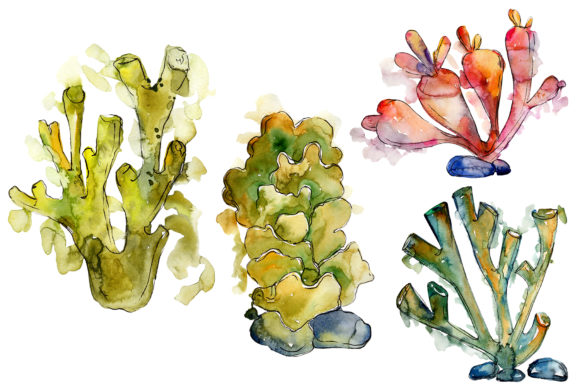
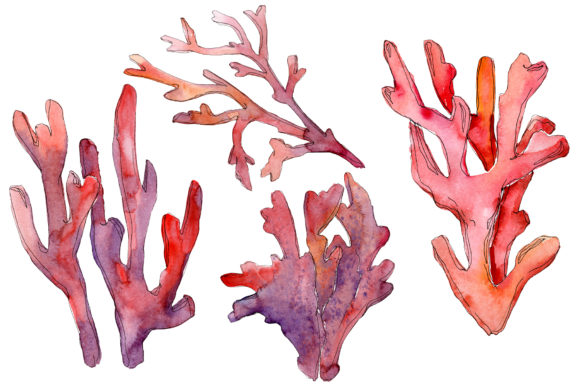
This pack contains four digital files that together offer a range of watercolor coral illustrations. The set includes two PNG files and two JPG files, all delivered at 300 dpi resolution. The PNG files feature transparent backgrounds, making them suitable for layering over other designs or backgrounds without additional editing. The JPG files, sized at 3500x3500 pixels, are designed for use as seamless patterns and frames. All elements are hand-painted, giving them a tactile, organic quality that differs from purely vector or digitally generated graphics.
The collection specifically includes:
- Isolated coral illustrations – individual watercolor elements that can be placed independently.
- Frames and borders – premade arrangements suitable for framing text or images.
- Patterns – repeating designs ready for use as backgrounds or textile prints.
- Additional decorative elements – smaller accents that complement the main illustrations.
Because each image is a separate file, users can mix, scale, and combine elements without being constrained by a single composite layout. The transparent PNG format allows for flexible compositing in most design software, including Photoshop, Procreate, Canva, and Affinity Designer.
Who Might Be Interested in This Type of Resource?
Digital watercolor collections appeal to a broad audience, but the coral theme makes this pack particularly relevant for certain niches. People researching, evaluating, or learning about this product often fall into one or more of these categories:
- DIY crafters – individuals creating custom invitations, greeting cards, or scrapbook pages who want a handmade look without painting each element from scratch.
- Wedding and event planners – those designing stationery for beach, coastal, or under‑themed weddings where coral motifs fit naturally.
- Small business owners – shop owners creating product labels, packaging, or promotional materials with a marine or tropical aesthetic.
- Content creators and bloggers – writers or social media managers who need unique, high‑resolution visuals for posts, quotes, or featured images.
- Hobbyist designers – people learning design who want ready‑made elements to practice compositing, color matching, and layout.
Understanding your own use case is the first step in evaluating whether this pack’s specific combination of file types, motifs, and resolution meets your practical requirements.
Benefits of Using Hand-Painted Watercolor Coral Elements
One of the primary advantages of this collection is the hand-painted quality of each illustration. Unlike vector graphics, watercolor elements have natural variations in opacity, texture, and edge softness. This can lend a more organic, less mechanical feel to finished designs. For projects where a human touch is valued—such as wedding invitations, art prints, or personal stationery—this characteristic is often a significant draw.
The 300 dpi resolution ensures that images remain sharp at typical print sizes. A 3500x3500 pixel file prints cleanly at about 11.6 inches square at 300 dpi, which is adequate for most card sizes, small posters, and digital displays. For users who primarily work in digital formats (social media graphics, blog headers, or web banners), the resolution is more than sufficient.
The transparent PNG format is another practical benefit. It eliminates the need for manual background removal, saving time when layering elements onto colored or textured backgrounds. This is especially helpful for users who are not experienced with selection tools or masking.
Having both isolated elements and precomposed frames/patterns gives users flexibility. Isolated elements allow for custom layouts, while frames and patterns provide quick solutions for projects with tight deadlines. A user designing a wedding invitation can start with a pre‑made border and then add isolated coral accents to personalize the design.
Considerations Regarding File Format and Editing
While the pack offers significant versatility, there are practical tradeoffs. The JPG files for patterns and frames are not on transparent backgrounds. This means that if you need to place a pattern over a dark or multi‑colored background, you will need to use blending modes or masking in your editing software. For users who prefer working exclusively with transparent elements, the two JPG files may require extra steps.
Additionally, the description states that elements are “full editable size, colors, etc.” but this refers to the flexibility within a design program rather than native source files. The PNG and JPG files are raster images, not layered PSD or AI files. Changing the color of a specific coral element will require manual selection and recoloring techniques, which may be challenging for users unfamiliar with digital painting or adjustment layers.
For those who need to quickly change colors across multiple elements or who require infinitely scalable graphics, vector-based alternatives may be more efficient. However, for users comfortable with raster editing, the hand-painted textures of this pack offer a look that is difficult to replicate with vectors.
Where Corals Watercolor Shines
This collection is a strong fit for projects that benefit from a soft, organic, coastal aesthetic. Some specific scenarios include:
- Beach or tropical themed weddings – save‑the‑dates, invitation suites, ceremony programs, and thank‑you cards can incorporate the frames and isolated elements.
- Marine biology or ocean conservation content – bloggers, educators, and nonprofit organizations can use the illustrations for infographics, social media posts, or educational materials that require a respectful yet visually engaging tone.
- Nursery or children’s room decor – the watercolor style is often considered gentle and appropriate for printable wall art, mobiles, or growth charts.
- Branding for coastal businesses – small shops selling beachwear, coral jewelry, or ocean-themed products can use the elements for packaging, tags, and signage.
- Quote cards and inspirational posters – the frames and borders provide a ready‑made container for typography, making it easier to produce professional-looking quote graphics quickly.
In these contexts, the hand-painted quality is a clear asset. The natural opacity variations and subtle color transitions give each design a sense of depth that flat digital graphics often lack.
When Alternatives Might Be Worth Considering
No single resource is ideal for every situation. There are cases where a different type of asset may serve a user better than the Corals Watercolor pack.
If you need a very large set of diverse elements – This pack contains four files. While each file includes multiple motifs within it (e.g., several coral shapes in one isolated PNG), the total number of distinct elements is limited. For a project that requires dozens of different coral species or many repeated motifs with slight variations, a larger collection or a custom illustration might be necessary.
If you require maximum color flexibility – As noted, raster recoloring is possible but not instantaneous. Users who need to generate many color variants quickly (e.g., matching five different brand palettes) may find vector assets more efficient. Vector files allow color changes with a single click, whereas raster watercolor elements require more manual work to maintain the painted texture after recoloring.
If your output is very large scale – For large banners, billboards, or oversized prints, the 3500x3500 pixel resolution may be limiting. At 300 dpi, this is roughly 11.6 inches. To print at larger sizes while maintaining 300 dpi, you would need to upscale the images, which can degrade quality. For such projects, higher resolution source files or vector alternatives are more practical.
If you need seamless repeat patterns with specific technical constraints – The JPG patterns are pre‑made at 3500x3500 pixels. While this is a generous size, users who need patterns that tile perfectly at specific dimensions or who require tile‑ready files with built‑in repeat logic may need to create their own patterns from the isolated elements. The pack itself does not appear to include dedicated seamless pattern files that are optimized for infinite tiling without visible seams.
Practical Decision-Making Insights
When evaluating the Corals Watercolor pack for your own work, consider the following questions:
- What is your primary output medium? If most of your work is digital (web, social media, PDF), the file dimensions and DPI are more than adequate. If you regularly print at large sizes, verify that the 3500 pixel dimension meets your needs or plan to use the elements at smaller scales within a larger composition.
- How much time do you want to invest in post‑processing? The transparent PNGs save time on background removal, but if you plan to recolor or heavily modify the elements, factor in additional editing time. For quick projects where you can use the colors as‑is, this pack is highly efficient.
- Do you prefer working with raster or vector tools? Users comfortable with raster editing (Photoshop, Procreate, GIMP) will find this pack straightforward. Users whose workflow is primarily vector‑based (Illustrator, Affinity Designer, Inkscape) may need to convert or trace the elements if they want to scale them infinitely or apply vector effects.
- Does the aesthetic match your brand or project tone? Watercolor coral illustrations have a distinct personality. They are typically perceived as gentle, artistic, and natural. If your project requires a more precise, geometric, or minimalist look, a different style of coral graphic may be more appropriate.
Aligning the Resource with Your Goals
For many users, the Corals Watercolor collection offers a practical middle ground between creating original watercolor art from scratch and using generic stock photography. The hand-painted quality provides a level of authenticity that is often missing from purely digital graphics, while the file formats and resolution ensure compatibility with standard design workflows.
If your project calls for a coastal, organic, or handcrafted feel, and you are comfortable with raster editing for any customizations, this pack can save hours of production time. If your needs involve extensive color variation, very large print formats, or a much larger volume of distinct elements, you may need to supplement this pack with additional resources or consider alternative formats.
Ultimately, the decision comes down to matching the pack’s specific strengths—hand-painted watercolor texture, transparent PNGs, and pre‑made frames/patterns—with the practical demands of your project. By assessing your medium, editing skills, and aesthetic requirements ahead of time, you can determine whether Corals Watercolor is the right fit for your next design effort.